Why WordPress bots keep knocking on your Java server

Running a server online comes with a lot of risks. Without proper security, unauthorized users can access sensitive endpoints or disrupt services.
In this post, we’ll walk through a simple practical example of basic protection of a Java server (like this blog) and show how to implement a basic anti-bot protection strategy.

How to block bots and scanners that are looking for WordPress on your Java servers
If your Spring Boot application has never run PHP, never installed WordPress, and never will — but your access logs are still full of requests for wp-login.php — congratulations.
You’re not under attack.
You’re just on the internet.
Let’s talk about why this happens, when it matters, and how to deal with it the right way — without wasting JVM threads, flooding your logs, or turning your app into a bot-trolling science project.
Why bots look for WordPress on Java servers
Most WordPress scanners are aggressively dumb by design.
They don’t:
- Detect your tech stack
- Read your HTML
- Learn from failures
They do:
- Sweep IP ranges
- Try the same list of paths everywhere
- Move on immediately if nothing responds
To them, your Java server is just another door handle to jiggle.
The first rule: don’t fight bots in your controllers
If a bot request reaches your Spring controller:
- A JVM thread woke up
- Your app did work
- Your logs got noisier
That’s already more attention than the request deserved.
Yes, you can handle scanners in Spring Boot — with virtual threads, async handlers, or clever routing — but in production, that should be your last line of defense, not the first.
The right place to solve this: Nginx (if you don't have a WAF)
If your app doesn’t serve PHP, then any request ending in .php is invalid.
You don’t need a list of WordPress paths.
You don’t need bot detection.
You just need one rule.
Block All .php Requests with 410 Gone
# Java app, no PHP here
location ~* \.php$ {
    return 410;
}
That’s it.
- No JVM involvement
- No application logs
- No bandwidth wasted past the proxy
Why 410 instead of 404?
- It’s explicit
- It’s cacheable
- Scanners lose interest faster
Also block common “secret” files
Bots love guessing config files too.
location ~* ^/(\.env|\.git|\.svn|phpinfo\.php)$ {
    return 410;
}
Again: fast, boring, effective.
Keep this noise out of your access Logs
There’s no reason to log requests you’ve already decided to ignore.
map $request_uri $loggable {
    default 1;
    ~*\.php$ 0;
    ~*^/(\.env|\.git|\.svn|phpinfo\.php)$ 0;
}

access_log /var/log/nginx/access.log combined if=$loggable;
Now your logs contain things worth reading.
Optional: slow down everything else
If a scanner starts guessing paths instead of filenames, rate limiting makes it pointless.
limit_req_zone $binary_remote_addr zone=botlimit:10m rate=5r/s;

server {
    location / {
        limit_req zone=botlimit burst=10 nodelay;
        proxy_pass http://spring_boot_upstream;
    }
}
This protects your app without affecting normal users.
What About Handling This in Java?
Yes, you can, this could be required if you don't have a proxy or you don't use a solution like Cloudflare.
- Java 21 virtual threads make tarpitting safer
- Async handlers prevent thread exhaustion
- Spring Security can short-circuit fake paths
These are useful tools — but they’re best reserved for defense in depth, not primary protection.
If Nginx can answer the request, your JVM shouldn’t even know it happened.
Spring Security Fallback: Defense in Depth
If you’re not using Nginx (or want an extra layer of protection), you can block .php requests directly in Spring Security. This is useful for:
Apps running behind proxies you don’t control
Cloud environments where edge rules are limited
Extra peace of mind.
import org.springframework.context.annotation.Bean;
import org.springframework.context.annotation.Configuration;
import org.springframework.security.web.SecurityFilterChain;
import org.springframework.security.web.util.matcher.AntPathRequestMatcher;
import org.springframework.security.web.util.matcher.OrRequestMatcher;
import org.springframework.security.web.util.matcher.RequestMatcher;
import org.springframework.http.HttpStatus;

@Configuration
public class BotBlockerConfig {

    @Bean
    public SecurityFilterChain botBlockerFilterChain(HttpSecurity http) throws Exception {
        // Match all .php requests and common scanner paths
        RequestMatcher phpMatcher = new AntPathRequestMatcher("/**/*.php");
        RequestMatcher envMatcher = new AntPathRequestMatcher("/.env");
        RequestMatcher gitMatcher = new AntPathRequestMatcher("/.git/**");
        RequestMatcher svnMatcher = new AntPathRequestMatcher("/.svn/**");
        RequestMatcher phpInfoMatcher = new AntPathRequestMatcher("/phpinfo.php");

        RequestMatcher blockedRequests = new OrRequestMatcher(
            phpMatcher,
            envMatcher,
            gitMatcher,
            svnMatcher,
            phpInfoMatcher
        );

        http
            .securityMatcher(blockedRequests)
            .authorizeHttpRequests(auth -> auth
                .requestMatchers(blockedRequests).denyAll()
            )
            // Return 410 Gone for blocked requests
            .exceptionHandling(handling -> handling
                .accessDeniedHandler((request, response, accessDeniedException) -> {
                    response.setStatus(HttpStatus.GONE.value());
                })
            );

        return http.build();
    }
}
Why this works?
No JVM thread wasted: The request is rejected before reaching your controllers.
Consistent with Nginx: Returns 410 Gone for uniformity.
Extensible: Add more RequestMatcher patterns as needed.
When to use this?
As a secondary layer if you already have Nginx rules.
If you’re running in a serverless or managed cloud environment.
For legacy apps where you can’t modify the proxy config.
The “Do Nothing” option
Sometimes the most professional response is:
410 Gone- No warning logs
- No alerts
- No emotional investment
A well-configured server doesn’t panic when an annoying script knocks on the door.
The PRO solution
If you are building an enterprise solution that brings the salary to you and your colleagues, you shold not play with all the bots on the web.
Using a WAF (Web Application Firewall) or CloudFlare are the recommended solutions.
The FUN solution
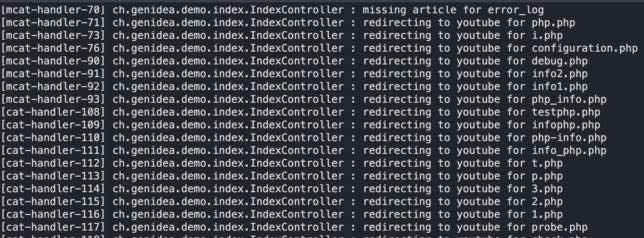
It's probably not effective and not worth the effort, but it's funny. You could redirect all the 'bad' requests to a video on YouTube.
TL;DR
- WordPress bots scanning Java servers is normal
- Don’t handle garbage traffic in your controllers
- Return
410for all.phprequests at the proxy - Use a WAF or CloudFlare if this is not a pet project
- Keep logs clean
- Let the JVM do real work
The modern web is noisy. Most of that noise isn’t aimed at your server — it’s just passing through trying to annoying everybody.
Handle it early and quietly.